November 2023 Release Notes
e-Builder Mobile App: Update your e-Builder mobile app to get the latest features.

November 17 - Web
 What's New
Color Scheme Retirement - December 15
The Color Scheme setting that allows accounts to customize colors for the top Global Navigation Tabs and grid headers will be retired and removed from availability by 15 December 2023.
The e-Builder team continues to pursue broad inclusivity and therefore accessibility to all persons through alignment of product functionality to Web Content Accessibility Guidelines (WCAG). Colors for text-based elements must be closely controlled to meet these accessibility standards. As part of these changes, the top global navigation tabs will be replaced by new navigation components in early 2024.
Administrators who wish to pro-actively return to the e-Builder default colors now can do so by accessing the Manage Color Scheme page [Setup >Administration Tools > Settings > Color Scheme] and clicking the Return to Defaults button.
For more details, see the lifecycle announcement that was published in August 2022.
Process String Fields with Default Values (Administrators Only)
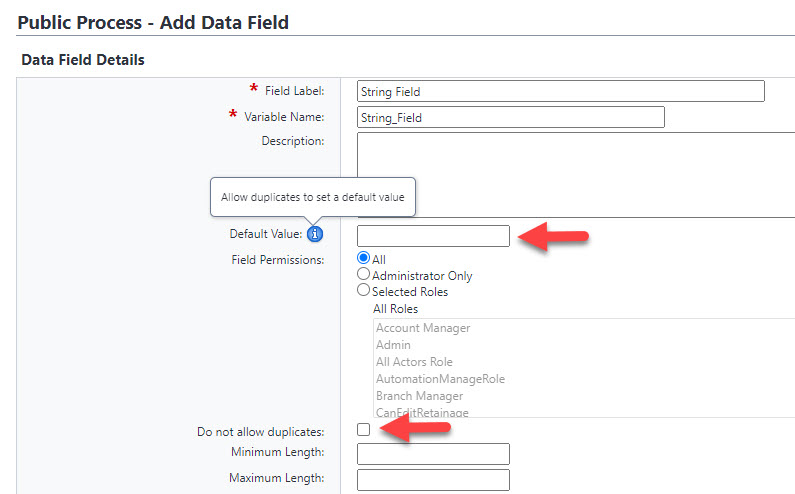
As part of this release, e-Builder has updated the behavior of String type Process Data Fields to prevent default values from being set whenever the field does not allow duplicates.
This update helps avoid errors that occurred if multiple process instances were created that used the same Default Value when duplicates were not allowed. For example, if a String type Process Data Field had a Default Value set to "Yes" and the Do not allow duplicates option was also selected, an error would occur when a process instance was created using the default value for this field and a subsequent instance was created also utilizing the same default value.
With this change, Administrators will be able to set a Default Value only if the Do not allow duplicates option is unchecked. If the Do not allow duplicates option is selected, the default value will be erased from the Default Value field and it will be removed from our database tables.
A new tool tip has also been added for the Default Value field which advises Administrators to allow duplicates in order to be able to set the default value.
Resolved Cases
The following issues have been resolved:
Cost
- Resolved an issue that affected Commitment Imports whenever the Project Identifier field mapping was not Project Name. Previously, those imports would not honor budget control tolerances and would return an incorrect budget control violation. Now, the budget control tolerances are honored. (Case# 487550)
Documents
- Resolved an issue which showed an error when attempting to download any .msg files that were emailed into a Document folder. (Case# 525616)
Forms
- All hard-coded HTML content on Forms will now be properly rendered. (Case# 535593)
Processes/ Workflow
- Resolved an issue with Budget Change processes on workflow steps where more than one actor is required to vote for the step action to be completed. Previously, if a user made edits to the cost grid and took action to vote without first saving the instance, their edits were not saved. Now, the cost edits are saved when the user takes action. (Case# 521312)
- Resolved an issue affecting Commitment Creation processes where files were not being uploaded successfully to process data fields when the user tried to "drag and drop". (Case# 526738)
- On workflow steps that allow users to request external comment, an issue occurred where the notification emails were not being sent to the external recipients if the workflow step was followed by one or more conditional steps. This issue has been resolved. (Case# 530431)
- Our spell checking tool has been updated for process data fields that are Rich Text boxes. (Case# 533298)
- Updates/ edits to hard-coded HTML content on the Process Properties page for Public Processes are now allowed. (Case# 534581)
- Users can now utilize customized process spawn buttons to ensure that child process instances are properly generated. (Case# 535264)
Reports
- Previously, when doing Funding Sources reports in BI, users were not able to see closed commitments. Now, closed commitments are displayed as expected. (Case# 520553)